
How to Shortlist Candidates for Interviews (With Criteria Examples)

One of the first roles I had to fill as a recruiter was an entry-level IT support specialist at a mid-sized healthcare company. The pay was modest, the skills were specific, and the timeline was urgent. Within 72 hours of posting, more than 300 applications were sitting in my inbox. A few were excellent. Most were not. The hard part was finding the handful actually worth interviewing without burning days I did not have.
Shortlisting is how you solve that. It is the step where you turn a pile of applications into a short, ranked list of people worth your time, and doing it well is often the difference between a good hire and a great one.
Below, you will find what shortlisting means, why it matters, the criteria to use, and the tools that make the process faster and fairer.
What Does It Mean to Shortlist Candidates?
In recruiting, shortlisting is the step between sourcing and interviewing. It is where you narrow a large applicant pool down to the most qualified people worth advancing.
Shortlisting usually involves:
- Reviewing resumes and applications against your predefined job criteria
- Comparing candidates on must-have versus nice-to-have qualifications
- Using tools like an ATS, scorecards, or AI screening to stay objective and efficient
- Working with the hiring manager to finalize the list
The numbers make the case for it. Recent estimates put the average corporate job opening at around 250 applications, and AI-assisted applications keep pushing that number higher. The funnel below shows how a typical hiring process narrows, from hundreds of applications down to a single hire. Each stage filters out candidates who do not meet your criteria, so your time goes to the most promising people.
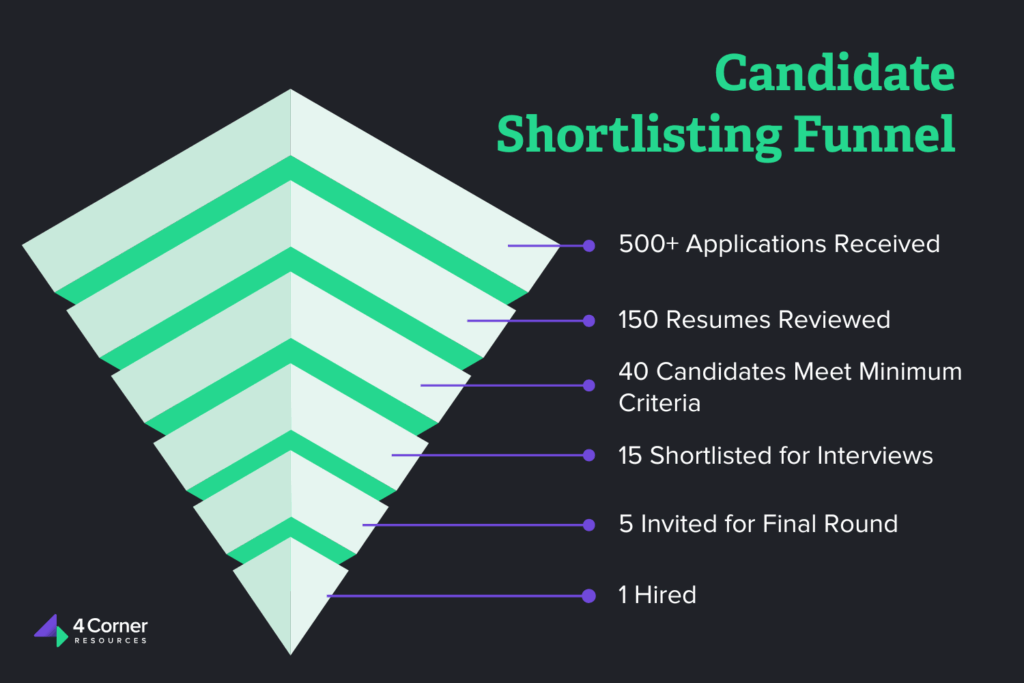
Seen that way, shortlisting is what keeps a strong candidate from slipping through the cracks while you are buried in volume.
Benefits of a Strong Shortlisting Process
A strong shortlisting process is a competitive advantage. When speed and precision both matter, how you filter candidates directly affects whether you land top talent before your competitors do.
- Saves time and resources. With a clear system for evaluating applicants, you spend less time second-guessing and more time interviewing the right people. You stop scheduling interviews with candidates who were never a fit, which frees up bandwidth for higher-value work.
- Improves candidate quality. Shortlisting filters out the noise so you can focus on applicants who actually fit your must-have skills, values, and business needs. You end up with a stronger interview slate and better odds of finding a standout.
- Reduces hiring bias. Structured criteria, like a scoring matrix or a checklist, cut down on gut-feel decisions and unconscious bias. Your process becomes more consistent and easier to defend, which matters most in high-volume or high-stakes hiring.
- Focuses your interviews. A solid shortlist makes the interview stage sharper. You can dig into each candidate’s real strengths and gaps instead of spending time on obvious disqualifiers.
- Improves the candidate experience. Applicants can tell when a process is organized. Shortlisting leads to faster responses and clearer communication, which, in turn, strengthens your employer brand.
Done well, shortlisting is how you confidently say yes to the right people, at the right time, for the right reasons.
Ready to hire someone great?
Speak with our recruiting professionals today.
How to Shortlist Candidates for Interviews
Shortlisting is a structured process, and when done well, it removes ambiguity and sets up better hiring decisions. Whether you are working through 20 applicants or 200, this framework helps you find the best matches without the overwhelm.
1. Make a list of baseline criteria
Defining your hiring qualifications is part of writing an effective job description, so you may already have this. If not, spell out the minimum a candidate must meet to do the job well.
Common baseline criteria include education requirements, a minimum number of years of experience, or specific technical credentials like a particular certification. Keep these baseline criteria objective and tied directly to job performance, rather than a gut feeling, a sense of similarity to the current team, or the hiring manager’s personal preference. Objective criteria improve hiring accuracy and keep you from unfairly screening candidates out.
2. Identify nice-to-haves
Next, list the qualities that make a candidate more appealing but are not strictly required: a more advanced degree, specialized training, prior leadership experience, or membership in a professional organization. Together with your baseline criteria, this gives you a clear standard to search against. For an example role, it might look like this:
Network Administrator
Minimum requirements:
- Bachelor’s degree in computer science or a related field
- Three years of experience in network administration or a similar role
- Knowledge of Cisco and Linux networking platforms
Preferred qualifications:
- Cisco CCNA certification
- Experience with customer-facing interactions
- Experience maintaining and updating security permissions
3. Assess your bandwidth
How many candidates should you shortlist? It depends on how many you can realistically evaluate closely. How many applicants do you expect? How many come pre-vetted, like referrals? How much time can you give to screening and interviews each week?
A good rule of thumb is to shortlist about 10% of total applicants, adjusted for your needs and the talent pool. For 100 applicants, 8 to 12 is workable; with several hundred, a smaller percentage is more realistic. Your recruiting metrics help, too. If it has taken about five interviews to find your top choice in the past, plan for at least five on the shortlist.
Being honest about your bandwidth keeps the search manageable. And when applicant volume routinely outpaces what your team can screen, outsourcing recruitment to a dedicated team keeps the shortlist moving without burning anyone out.
4. Use a structured resume screening checklist
Once your criteria are set, create a checklist to evaluate every resume consistently. It can be a simple spreadsheet or a full ATS filter. Include relevant job titles, technical skills, education, career progression, and key accomplishments. A checklist keeps you focused, speeds up review, and lowers the risk of passing over a qualified person because of resume formatting or other surface distractions.
Related: What to Look for on a Resume
5. Apply your criteria to each applicant
Now evaluate each applicant against your defined criteria. Work through every resume methodically, weighing each component consistently. Look at hard skills like data analysis, project management, or programming languages, and at soft skills, which often show up in how someone describes their work or communicates in an early email. Factor in cultural fit too, especially if your team has distinct values or work styles. The goal is not the perfect candidate; it is to move the most qualified ones into the next stage.
6. Score or rank candidates with a matrix
To add structure and fairness, use a scoring matrix. Assign a numerical value to each qualification, for example, rate experience with a given tool out of 5, then total the scores for each applicant. Weighting the criteria that matter most, like a required certification, helps when some qualifications matter more than others. A matrix ranks candidates and gives you documentation to explain your shortlist to hiring managers.
7. Flag red flags for follow-up
As you review, you will spot red flags: unexplained employment gaps, several short stints, or typos and formatting errors. These are not automatic disqualifiers, but they deserve a closer look. A frequent job-changer may have good reasons, and a career gap might stem from caregiving or school. Rather than dismissing someone too quickly, note the concern and raise it during the pre-screen or interview.
Related: Resume Red Flags to Watch Out for When Hiring
8. Collaborate with the hiring manager
Shortlisting should not happen in a vacuum. Once you have your top picks, walk the hiring manager through them. Share the reasoning behind each selection, gather their feedback, and confirm alignment before anyone moves to interviews. Looping them in prevents surprises later and builds the hiring manager’s confidence in the process and in you.
Common Shortlisting Criteria Examples
Not every role calls for the same qualifications, and not every candidate should be measured the same way. Role-specific criteria are what make shortlisting accurate. Below are the categories worth building your criteria around.
Job-based criteria
These are the most direct qualifications, tied straight to the responsibilities of the role: years of relevant experience, technical competencies, industry knowledge, and familiarity with specific tools. For a digital marketing manager, that might mean managing paid campaigns, proficiency with Google Analytics, and a solid grasp of SEO. Each one should map to your job description and be easy to spot on a resume.
Cultural fit criteria
Cultural fit means finding candidates whose values, work habits, and collaboration style match how your company operates. A fast-paced startup might prioritize self-starters comfortable with ambiguity; a structured corporate environment might weigh attention to detail and process. These qualities are harder to read on a resume, but they often surface in how someone describes past roles or in an early phone screen.
Role-specific criteria
The strongest criteria are tailored by role. A few examples:
- Sales roles: Past quota performance, CRM experience, a record of closing, and communication skills. Industry or territory experience is a plus.
- IT and tech roles: Programming languages, certifications like AWS or CompTIA, experience with specific stacks, and problem-solving ability. Code samples or a GitHub link help.
- Healthcare roles: Required licenses or credentials, bedside manner (often inferred from references), and experience with specific populations or equipment.
- Marketing roles: Portfolio strength, analytics knowledge, creative thinking, and familiarity with tools like Adobe Creative Suite or HubSpot.
Match candidates against these benchmarks so you are not hiring someone who only looks good on paper.
Tools That Can Help With Shortlisting
Applicant tracking systems (ATS)
Examples: Greenhouse, Workable, Lever
An ATS is your command center for recruitment. You post jobs, collect applications, and filter candidates on custom rules. Hiring a project manager? You can flag resumes that mention “PMP certification” or “Agile,” and add screening questions that filter out anyone who does not meet a hard requirement, which keeps your shortlist focused from the start.
Related: The Best Recruiting Technology: Top Tools for Hiring Teams
AI resume screening tools
Examples: HireVue, SeekOut, HiredScore
AI tools use natural language processing to match resumes against a job description and surface the closest fits. Hiring a software engineer who knows Python, Django, and AWS? The tool scans thousands of profiles, ranks them by relevance, and flags strong matches even when the exact keywords are missing. Many also anonymize candidate data to reduce bias during screening.
Pre-employment assessment platforms
Examples: Codility, Vervoe, TestGorilla, Criteria Corp
Resumes can exaggerate; skills tests do not. These platforms let you evaluate candidates on real tasks before an interview. For a copywriter, a short writing test shows grammar, tone, and creativity. For technical roles, a platform like Codility measures coding under time pressure. Either way, you get a data-based reason to advance someone or pass.
Related: How to Use Pre-Employment Assessments to Make Better Hires
Scorecards and custom spreadsheets
Examples: Google Sheets, Excel, built-in ATS scoring
A scorecard brings objectivity to shortlisting. List your top five qualifications across the columns, score each candidate 1 to 5, weight the ones that matter most, and total them. For a marketing analyst, you might weigh Google Analytics and SQL more heavily. The highest scores rise to the top, and the record makes your decisions easy to justify.
Related: The Ultimate Guide to Interview Scoring Sheets
Recruitment automation tools
Examples: Calendly, Paradox.ai, Zapier
Repetitive tasks like scheduling, resume parsing, and rejection emails can be automated to free up recruiters’ time. Calendly lets candidates book interview slots directly. Paradox.ai screens candidates through automated Q&A before they reach your inbox. Zapier can tag applicants in your ATS or automatically update a candidate database.
Related: The Top Recruitment Assessment Tools and Technologies for 2026
Let Us Handle the Screening for You
Done well, the process helps you zero in on top talent, protect your time, and build a team that performs and stays. The key is intention: define your criteria, use the right tools, remove bias where you can, and tailor the process to each role.
At 4 Corner Resources, the screening and selection is the part we take off your plate. Our recruiters do it against your goals, your culture, and your timeline, and we take it further than most. The fewer candidates we send before you hire, the better we have done. Ideally, that number is one. One candidate submitted, one interviewed, one hired. Our 1.4 to 1 interview-to-hire ratio, against an industry average closer to 5 to 1, is what that discipline looks like in practice.
Whether you are hiring your first employee or your hundredth, our recruiters can handle the screening and coach you through the rest, from refining the job description to preparing role-specific interview questions. Reach out to our team and tell us what you are looking for. We will take it from there.
Frequently Asked Questions
A good rule of thumb is about 10% of your applicants, adjusted for the role and your bandwidth. For 100 applicants, 8 to 12 is workable. A simpler gut check: keep at least as many as your typical interview-to-hire ratio, so if you usually interview five people to make one hire, hold at least five candidates in the mix.
Shortlisting is the step between sourcing and interviewing, where you narrow a large applicant pool down to the qualified few worth advancing. It happens after resume screening and before interviews begin.
Applicant tracking systems like Greenhouse or Workable filter applicants against set criteria, AI screening tools rank resumes by relevance to the job description, and scorecards or assessment platforms add structure. Most teams use a combination.
Define objective, job-related criteria before you review anyone, score every candidate against the same matrix, and consider anonymizing resumes on the first pass. Structured criteria reduce gut-feel decisions and make your process easier to defend.
Get More Hiring Tips Straight to Your Inbox