
How to Optimize Your LinkedIn Profile

If a recruiter were to search for someone with your exact background right now, would your profile show up? More importantly, would it make them want to reach out?
For most people, the honest answer is probably no. LinkedIn is a search engine, and recruiters use it the same way you use Google, entering job titles, skills, and filters until the right candidates surface. With over a billion members on the platform and recruiters spending an average of six seconds scanning a profile before moving on, a profile built without that in mind is essentially invisible.
The numbers back this up. Optimized profiles are 40 times more likely to receive opportunities through the platform, according to LinkedIn’s own data. A ResumeGo study found that job applicants who included a comprehensive LinkedIn profile link on their resume had a 71% higher callback rate than applicants with no LinkedIn presence at all.
At 4 Corner Resources, we search LinkedIn every day to source and evaluate candidates across industries. The difference between a profile that gets a message and one that gets scrolled past almost always comes down to a handful of specific things that are entirely within your control.
Walk through every section below, with specific examples and advice you can start using today.
Step 1: Enhance Your LinkedIn Headline for Search Visibility
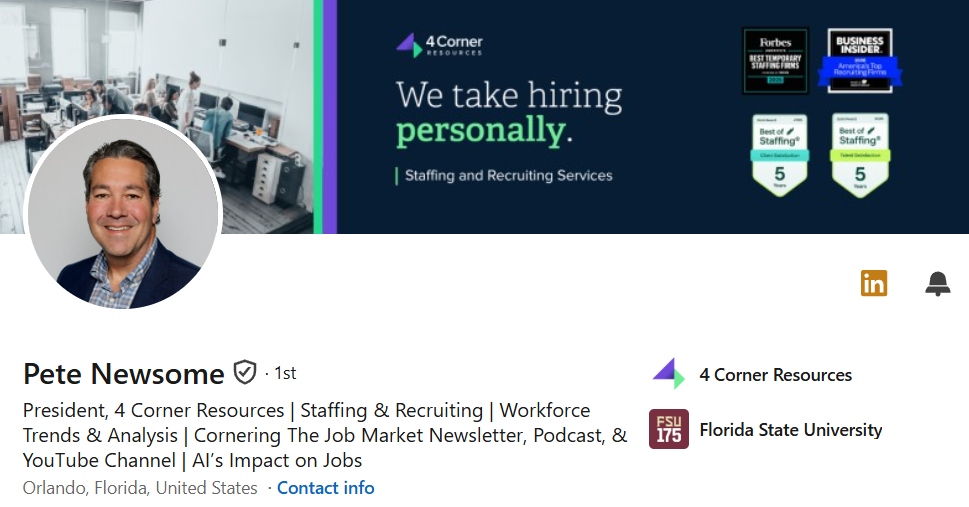
Your headline is the single most important piece of real estate on your profile. It appears directly below your name in every search result, every connection request, and every comment you leave anywhere on the platform. It’s also one of the most heavily weighted fields in LinkedIn’s search algorithm, and a weak headline actively keeps you from being found in the first place.
LinkedIn gives you 220 characters to work with. Most people use about 40, defaulting to something like “Marketing Manager at XYZ Company.” A missed opportunity in every sense.
What to include in your LinkedIn headline
A strong headline accomplishes three things at once: it tells LinkedIn’s algorithm what searches to surface you for, it tells a recruiter what you do at a glance, and it gives them a reason to click through to your full profile.
The components that accomplish all three:
- Your target job title, using the exact language from job postings you’re targeting, not internal titles no one searches for
- Your top skills or areas of expertise, especially searchable terms like software names, certifications, or specialty areas
- A value statement or differentiator: something that communicates what you bring to the table beyond your job title alone
The strongest headlines hit at least two of these.
Headline formulas that attract recruiters
There’s no single correct formula, but these structures consistently perform well:
- [Target Title] | [Top Skill or Specialty] | [Differentiator or Value Statement]
- [Target Title] helping [audience] achieve [outcome]
- [Target Title] | [Credential or Tool] | [Years of Experience or Industry]
The pipe character ( | ) is the standard separator because it’s clean and readable. Some people use slashes or bullet points (•) to the same effect.
Examples of optimized headlines by industry
Here’s what the difference looks like in practice:
Marketing
- Marketing Manager at Acme Corp → Digital Marketing Manager | SEO, Paid Media & Content Strategy | B2B SaaS
Finance
- Senior Accountant → CPA | Senior Accountant Specializing in Tax Compliance & Financial Reporting
Technology
- Software Engineer → Full-Stack Developer | React, Node.js, AWS | Building Scalable Web Applications
HR
- HR Generalist → HR Business Partner | Talent Acquisition & Employee Relations | SHRM-CP
Healthcare
- Registered Nurse → RN | ICU & Critical Care | 8 Years of Clinical Experience
Sales
- Account Executive → Enterprise Account Executive | SaaS Sales | Consistently 120%+ of Quota
Every optimized example above uses the language a recruiter would actually type into a search bar. When we search for candidates at 4 Corner Resources, we’re entering job titles and skills, not names and companies. Your headline needs to speak that language.
Step 2: Write a Keyword-Optimized About Section
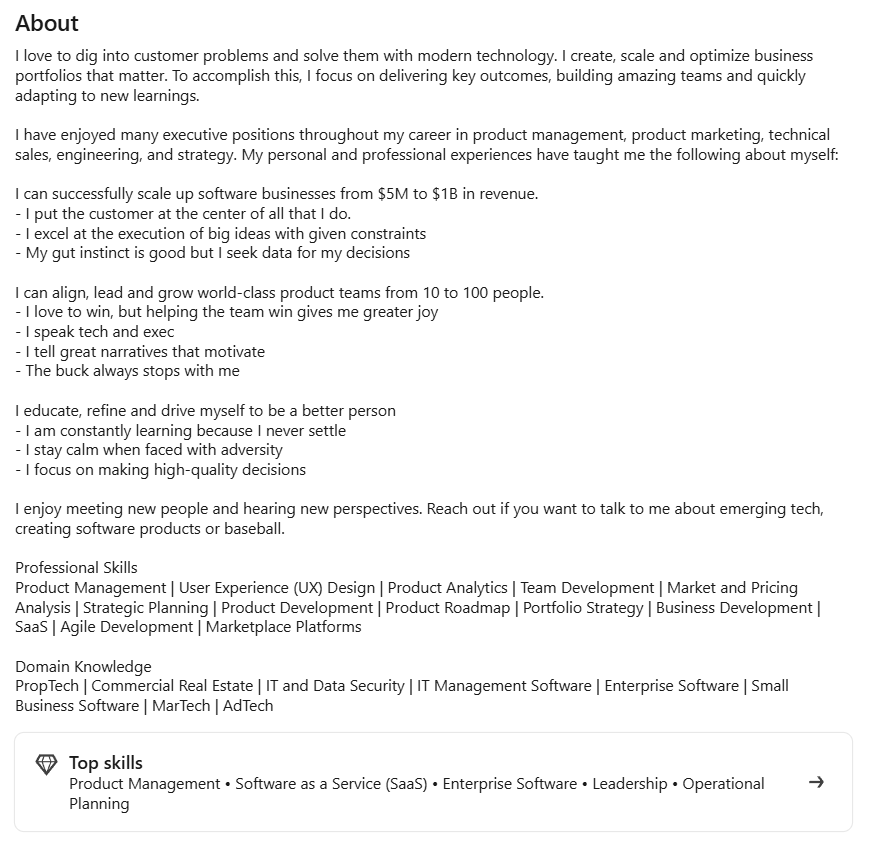
The About section is where your headline’s promise gets delivered. It’s your chance to add context, personality, and depth to who you are professionally, and it also has to pull its weight algorithmically. With a 2,600-character limit, you have real room to work with. Most people barely use a third of it.
How to structure your LinkedIn summary
LinkedIn only shows the first 300 characters before the “See More” prompt, so your opening line needs to do the heavy lifting. Skip something generic like “Experienced professional with a passion for results” and open with something specific that makes a recruiter want to keep reading.
A structure that works well for job seekers:
- Hook: One or two sentences that immediately communicate who you are and what you’re known for
- Background: A brief narrative connecting your career path to where you want to go
- Proof: Two or three specific accomplishments with numbers attached
- Skills: A short list of core expertise that doubles as keyword territory
- Call to action: One clear sentence inviting connection or outreach
Write in first person: it reads more naturally, and LinkedIn’s own communications team recommends it. Keep individual paragraphs to two or three sentences, use a brief bulleted list for skills or accomplishments, and end with something simple like “Feel free to reach out at [email] or connect here on LinkedIn.” Walls of text, even great ones, get skipped.
How to identify the right keywords for your profile
Keywords on LinkedIn work differently than they do on Google. Recruiters search for short, direct terms: job titles, software names, certifications, and specific skills rather than descriptive phrases. “Project Manager” gets searched far more often than “experienced cross-functional leader.”
To find the right keywords, pull up three to five job postings for the roles you’re targeting and look for terms that appear repeatedly in the requirements and responsibilities sections. Those are the exact words recruiters are entering into search filters. Work them naturally into your About section, your headline, and your experience entries.
One more place worth checking: look at profiles of people already working in your target role, especially those who surface high in search results. The language they’re using is almost certainly what recruiters are searching for.
Step 3: Optimize Your Experience Section for Recruiter Searches
Most people copy and paste their resume into the experience section and call it done, which is a huge missed opportunity. Each role’s description can hold up to 2,000 characters, more space than most resume bullets combined, and every word is indexed by LinkedIn’s search engine.
How to rewrite job descriptions using results-driven bullets
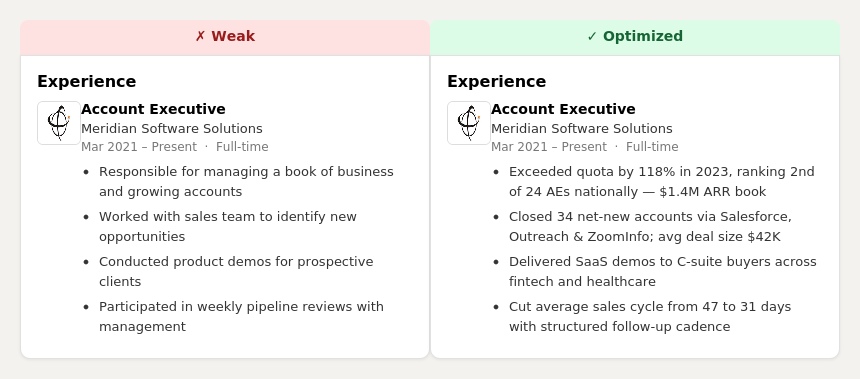
The experience section should read like an accomplishment log, not a job description. Instead of “Responsible for managing social media accounts,” write “Grew Instagram following from 4,200 to 28,000 in 14 months through a targeted content strategy and paid amplification.” The first tells a recruiter what you were assigned to do. The second tells them what you actually delivered.
Strong experience bullets follow this pattern: action verb + task or responsibility + result or context. You don’t need a number attached to every bullet, but specificity makes your claims credible in a way that vague language simply cannot.
Where and how to add keywords naturally
Your target keywords should appear in your job titles (where accurate), in the description of each relevant role, and in the names of tools, systems, or methodologies you used. If you managed a team using Agile and Jira, those words should appear in the text. If you ran paid campaigns across Google Ads and Meta, name them specifically.
Recruiters expect to see the tools, systems, and methods you actually used. Adding that language is precision, not padding.
Why metrics dramatically improve profile performance
Numbers make your experience credible to humans and to algorithms alike. They signal completeness and specificity, which LinkedIn rewards with higher search rankings. More practically, recruiters are pattern-matching for candidates who can demonstrate impact, not just describe activity.
Revenue generated, percentage growth, team size managed, cost savings delivered, response times improved: if you can quantify it, do. Approximations like “increased lead volume by roughly 30%” are still far more compelling than nothing at all.
Step 4: Strengthen Your Skills Section for Algorithm Ranking
The Skills section not only tells visitors what you’re good at but also directly feeds LinkedIn’s search algorithm. When a recruiter filters candidates by skill, your profile only surfaces if that skill appears in this section. It’s one of the easiest, highest-impact adjustments you can make.
How LinkedIn ranks profiles based on skills
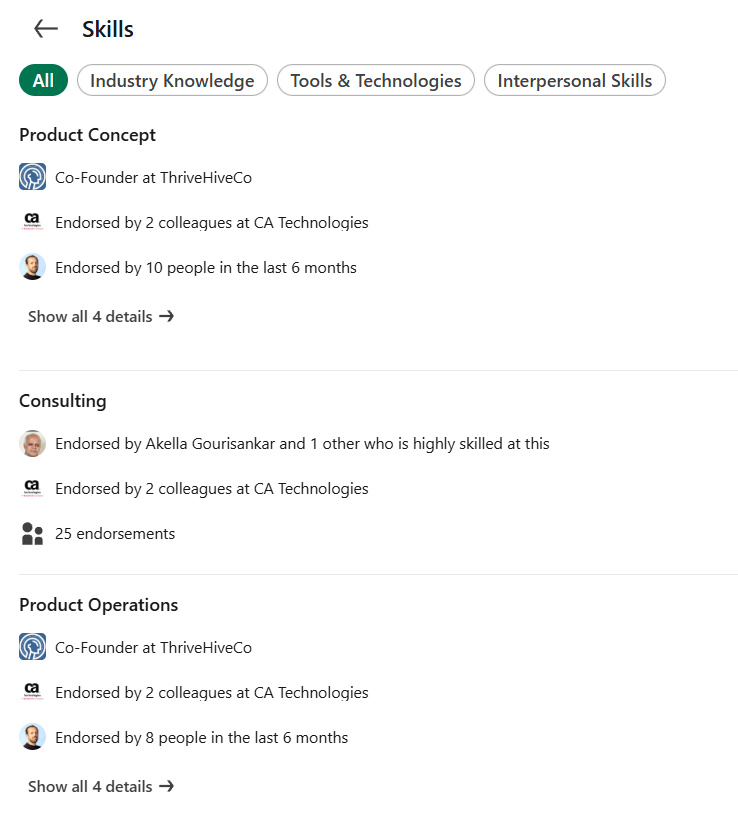
LinkedIn’s algorithm uses your Skills section to group your profile into skill clusters. The more your skills match the keywords in a recruiter’s search, the higher you rank in their results. Endorsed skills carry additional weight, functioning as a trust signal that reinforces your relevance for those search terms.
LinkedIn currently allows you to list up to 100 skills, but more isn’t always better. Adding a large number of vague or irrelevant skills can dilute your profile’s focus and make it harder for the algorithm to place you accurately. Aim for 20 to 30 that are specific and meaningful to your target roles. The three skills that appear at the top of your profile before the “Show More” prompt matter most: make sure those three reflect your most searchable, most important capabilities.
How to choose the right skills for your target role
Skip vague soft skills like “Leadership” or “Communication” and focus on hard, specific, searchable terms. Think software names, platforms, methodologies, certifications, and industry-specific competencies. “Salesforce CRM” gets searched, while “Strong communicator” does not.
Cross-reference the job postings you used for keyword research and pull every skill you legitimately have from those requirements. Once you’ve built your list, ask a few colleagues or former managers to endorse the skills they’ve seen you use in practice. Those endorsements automatically push your most important skills to the top of the section.
Step 5: Use the Featured Section to Increase Profile Conversions
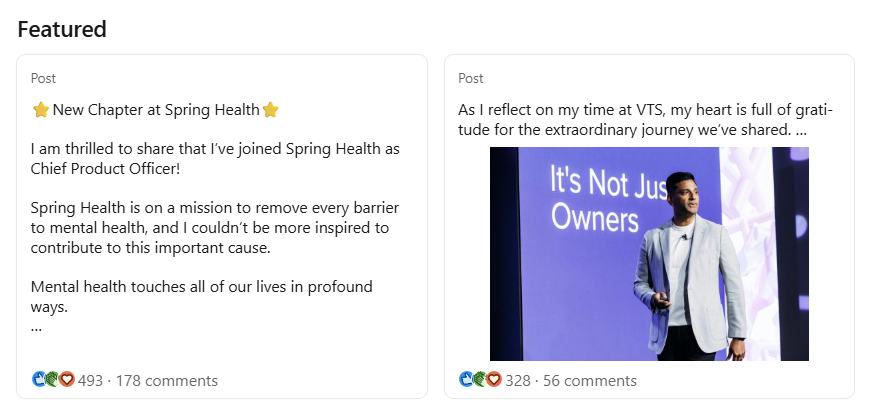
The Featured section sits near the top of your profile, right below the About section, and it’s one of the most underutilized tools available to job seekers. While the rest of your profile tells recruiters who you are, the Featured section lets you show them.
What to include in the Featured section
What you pin here depends on your industry and career stage, but the best choices offer the fastest, clearest proof of your capabilities:
- Your resume as a PDF or file-sharing link, putting it one click away for any interested recruiter
- Portfolio pieces: writing samples, design work, case studies, code repositories, or presentations
- LinkedIn posts that performed well, which show recruiters you’re active and knowledgeable on the platform
- Certifications or credentials with a link to the issuing body
- A personal website or professional bio page, if you have one
Keep it to two to four items. A clean, curated Featured section signals intentionality. Too many items dilute the impact of each one.
How to make your profile conversion-focused
Think of the Featured section as the “above the fold” version of your professional portfolio. Someone who lands on your profile should be able to understand what you do, feel confident in your credibility, and know exactly how to take the next step, all within the first scroll. The Featured section is your best opportunity to turn a profile view into an actual conversation.
Step 6: Improve Your Profile Photo and Banner for Credibility
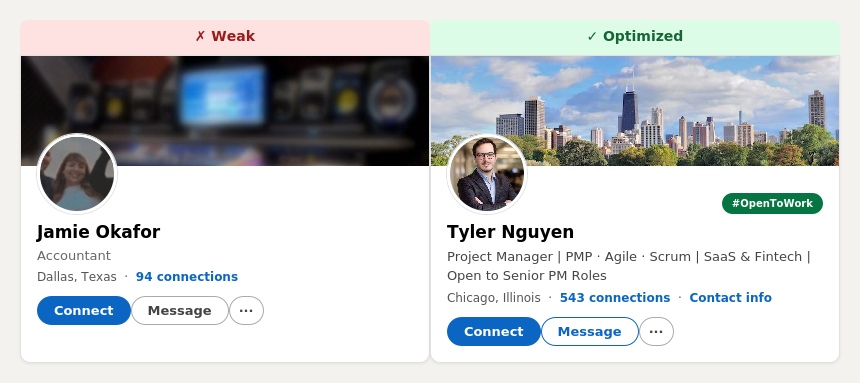
Before a recruiter reads a single word of your profile, they’ve already formed an impression based entirely on your photo and banner. These two visual elements shape how credible, professional, and approachable you seem before any content is consumed. Getting them right is table stakes.
What makes a high-performing LinkedIn headshot
Your profile photo should be recent, clear, and professional. You don’t need a studio shoot. Your face should take up at least 60% of the frame, the background should be simple and uncluttered, your attire should match your industry, and you should be smiling. Natural light works well. A recent smartphone camera is more than sufficient.
Technically, aim for at least 400×400 pixels (800×800 is better for clarity when zoomed in). Keep the file under 8MB and use JPG or PNG format. Profiles without a photo are skipped almost universally by recruiters. Don’t let that be the reason you get overlooked.
How to use a banner strategically
The background banner sits behind your photo and name at the top of your profile, and most people either leave it as the default blue gradient or upload something generic. A missed branding opportunity. Your banner is 1,584×396 pixels of prime real estate.
Effective banners do at least one of the following: communicate your professional identity, reinforce your specialty, or visually establish credibility in your field. A content marketer might use a clean graphic with their areas of focus. A software developer might feature a tech-themed visual or their GitHub stats. A speaker or trainer might use a photo from a presentation.
Keep it clean. Text should be minimal and readable on both desktop and mobile, since the banner crops differently depending on the device. Canva offers free LinkedIn banner templates, making this quick to set up.
Step 7: Increase Your Visibility With LinkedIn Activity
Here’s something many job seekers miss: your profile’s search ranking is also influenced by how active you are on the platform. LinkedIn’s algorithm rewards engagement. Profiles that post regularly, comment meaningfully, and show signs of consistent activity surface higher in recruiter searches than identical profiles that have gone quiet.
How posting content boosts profile ranking
When you post on LinkedIn and that content gets engagement, your profile picks up what the algorithm treats as a relevance signal. It tells LinkedIn that you’re active, that your content resonates with your network, and that your profile is worth surfacing. You don’t need viral posts. Consistent, relevant content that earns real comments and reactions is far more valuable than one big hit followed by weeks of silence.
LinkedIn’s current algorithm rewards what it calls “knowledge content” (posts that teach something, share a perspective, or spark a genuine professional conversation). Content that asks for empty engagement (“comment YES if you agree!”) is actively deprioritized.
What job seekers should post
You don’t need a thought-leadership brand or a scheduled content calendar to post effectively on LinkedIn. The most effective content for job seekers tends to be simple, specific, and rooted in real professional experience:
- Lessons learned from a project or challenge in your field
- Your take on a relevant industry trend or news story
- A skill or tool you’ve been building and what you’ve found useful about it
- A thoughtful comment on someone else’s post, which counts as activity and increases your profile’s visibility
Short-form posts, two to five sentences with a clear point, tend to perform well and are easy to produce consistently.
How often to engage for optimal reach
Two to three posts per week is a sustainable pace that signals consistent activity without requiring a full content operation. If posting feels like too much, start by engaging with other people’s content. Leaving specific, substantive comments on posts from people in your industry is one of the fastest ways to build visibility with minimal effort. Every comment you leave links back to your profile.
Consistency is the thing. LinkedIn’s algorithm suppresses profiles that go quiet for extended periods, which means showing up occasionally and then disappearing is actually worse than a steady, moderate presence.
Common Mistakes to Avoid
Even well-intentioned profiles fall into patterns that hurt their visibility or credibility. At 4 Corner Resources, we review candidates’ profiles on a regular basis, and the same issues come up again and again.
- Using your current job title as your entire headline. Your company name doesn’t appear in recruiter keyword searches; your title and skills do. A headline that reads only “Account Manager at Walgreens” is searchable by title but misses every other keyword opportunity across your 220 characters.
- Leaving the About section blank or minimal. A two-sentence summary tells a recruiter almost nothing and signals an incomplete profile, which LinkedIn’s algorithm penalizes in search rankings.
- Writing job descriptions like a resume from 2005. Passive, duty-focused language (“Responsible for…”) is weaker than results-oriented language at every career level. If every bullet starts with “Responsible for,” rewrite it.
- Listing skills you don’t actually have. LinkedIn’s algorithm is increasingly sophisticated, and the absence of endorsements around claimed skills can flag inconsistencies. Stick to what you know.
- Only updating your profile when you’re job searching. The professionals who consistently attract the most inbound interest on LinkedIn are those who treat their profiles as living documents, not something they dust off in a panic.
- Not enabling “Open to Work” if you’re actively looking. You can limit visibility to recruiters only so your current employer won’t see it, and it meaningfully increases the likelihood of being contacted.
How to Know If Your LinkedIn Profile Is Optimized
LinkedIn gives you a direct readout. Look for “Search Appearances” in your profile dashboard analytics. It shows how many times your profile surfaced in a search over the past week, what keywords people used to find you, and their job titles. If you’re not seeing the right roles or companies in those results, revisit the keywords in your headline and skills section.
You can also run a quick test: search LinkedIn as if you were a recruiter looking for someone with your background. Enter your target job title and a couple of key skills, and see where your profile lands. If you’re on page two or three for your own keywords, the optimization work isn’t done yet.
Final LinkedIn Profile Optimization Checklist
Before you consider your profile complete, run through this checklist. For a more detailed breakdown with explanations for each step, see our LinkedIn profile checklist.
Profile Foundation
- Professional headshot uploaded (400x400px minimum, face fills 60%+ of frame)
- Custom banner image uploaded (1,584x396px)
- Custom LinkedIn URL set (linkedin.com/in/yourname)
- “Open to Work” enabled (if actively searching)
- Industry and location fields completed
Content
- Headline uses 150+ of your 220 characters and includes target title and keywords
- About section opens with a strong hook visible before “See More”
- About section written in first person and ends with a CTA
- Every current and recent role has a results-focused description with at least one metric
- Skills section includes 20 to 30 relevant, searchable hard skills
- Top three skills reflect your most important, most searchable competencies
- Featured section has 2 to 4 curated items (resume, portfolio, strong posts)
Visibility and Credibility
- Profile has reached “All-Star” status
- At least 50 connections (the minimum needed to appear in broader searches)
- Skills have endorsements from colleagues or former managers
- At least one recommendation on the profile
- Posting or engaging with content at least two to three times per week
- Search Appearances reviewed in analytics to verify keyword performance
Looking for more guidance on your job search? Check out our resources on how to search for jobs on LinkedIn, how to message someone on LinkedIn about a job, how to connect with a recruiter on LinkedIn, and how to stand out when applying for a job. Or, if you’d like expert support, explore the open positions we’re currently placing or reach out to our team directly.
FAQs
Most people see an increase in profile views and search appearances within one to two weeks of making meaningful changes, particularly to the headline, About section, and skills. Recruiter outreach takes longer and depends on the strength of your network, your industry, and how competitive your target roles are. Think of the first month as building the foundation. Months two and beyond are when the compound effects start showing.
Generally, no. Roles older than 10 to 15 years have diminishing relevance for most job seekers, and a bloated experience section can work against you by burying your most recent and relevant work. Focus on positions most relevant to what you’re targeting now. Earlier roles can be listed with minimal detail: title, company, dates, and a single line if anything from that period is directly relevant to your current direction.
It depends on how you’re using the platform. LinkedIn Premium gives you InMail credits to message people outside your network, insights into who’s viewed your profile, and data on how you compare to other applicants. For active job seekers proactively reaching out to hiring managers and recruiters, it can be worth the cost. If you’re primarily optimizing your profile to attract inbound interest, the free version is sufficient for most people.
Address them directly rather than leaving the timeline blank. LinkedIn lets you add descriptions to any experience entry, and you can list freelance work, volunteer roles, courses, and certifications to account for time between jobs. A brief, honest line in the About section works well, too: “In 2023, I stepped back from full-time work to care for a family member before returning to the workforce.” Recruiters notice unexplained multi-year gaps more than they notice gaps explained clearly. An honest profile is always stronger than one that tries to hide something.
Lead with skills, not titles. If you’re early in your career, use your headline and About section to highlight the specific tools, methodologies, and capabilities you’ve developed, even through academic work, internships, or freelance projects. Quantify everything you can, even if the numbers feel small. Entry-level recruiters are searching for skills, not years, and a profile that clearly communicates what you know and what you’ve done with it will surface in those searches.
Get More Hiring Tips Straight to Your Inbox